
We’re truly living in crazy times. New AI tools and ideas reshape how developers work almost daily — the moment I invest time into improving my AI workflow, something new comes out and makes the workflow I just built feel outdated. That’s the opposite of how Apple-platform development used to feel. New tooling traditionally landed in a single annual reveal, and WWDC week was, for me at least, a kind of Christmas-during-work-hours: comfortable, plannable, and exciting.
That comfort had been eroding for a while. Open-source Swift, the Swift Evolution process, packages and tools shipping every few weeks, Swift on Android — all of that gradually moved some of the action outside the WWDC envelope. But things really cracked open with ChatGPT and Claude Code. Honestly, I was skeptical of AI tooling in the pre-agentic era, when “AI for developers” mostly meant chat windows and autocomplete. That changed for me sometime over the last twelve months, and I’ve spent the time since trying to figure out what my development workflow even looks like now. Like a lot of people.
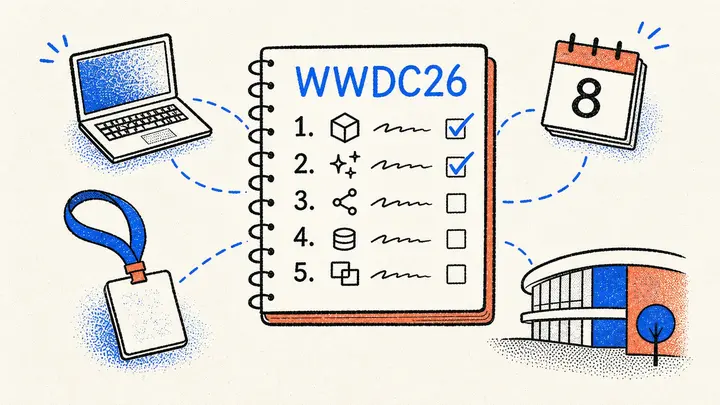
So I was genuinely glad when Apple announced WWDC26 for the week of June 8 and put it in plain language: “incredible updates for Apple platforms, including AI advancements and exciting new software and developer tools.” So I sat down and asked myself: what are the five things only Apple could ship that would most improve my agentic-engineering workflow? Here’s what I came up with.
ℹ️ About 33% of items from my past WWDC wishlists have actually shipped. Two from my WWDC24 wishlist eventually arrived: String Catalog multi-select at WWDC25, and the new
RenderPreviewtool in the Xcode 26.3 MCP server (mid-cycle, in February). So Apple does deliver — sometimes outside the WWDC reveal.
#1 – An LLM-grade UI introspection API
When I want my agent to verify that a screen actually looks right after it changed code, I have two options today: send screenshots to a multimodal model (slow, expensive, fragile), or query the accessibility tree via Peekaboo / xcodebuildmcp (better, but the AX API was designed for screen readers). The AX tree tells you “this is a button labeled ‘Save’” — it doesn’t tell you that the button is 44pt tall, has a corner radius of 12, sits inside an HStack with 16pt spacing, fades in via a 0.3s transition, and triggers an async network call when tapped.
Xcode’s View Debugger already exposes much of this. On a running app, you can see every view’s frame, modifier stack, constraints, layer properties, and attached gesture recognizers in structured form. What’s missing is a textual, machine-readable export of that data. Imagine if my agent could ask the running app: “give me the full layout tree as JSON, with sizes, colors, gestures, animations, and async hooks attached to each interactive element.” Click intents become deterministic. The agent can wait on the right async operation instead of polling. After a tap, it can read the new layout and compare against expected state — without ever taking a screenshot.
And if the Simulator picked up hot-reloading like SwiftUI Previews — and the same introspection API was exposed by Previews themselves — the iteration cycle for both human-driven and agent-driven UI work would collapse from minutes to seconds.
The accessibility tree is the wrong abstraction for agents. It’s optimized for screen-reader users navigating linearly. Agents need to walk the real view hierarchy: clickable regions, scrollable areas, loading states, animation timing, async hooks. A debug-only “disable animations for AI evaluation” toggle in Xcode would let agents tour a full app in seconds instead of minutes. And bigger picture, a system-wide variant of this API — exposed by every app, not just ones under the debugger — would let agents navigate any app on the system, with developers getting extra debug-mode goodies on top.
I wish for a structured layout/style/gesture API agents can subscribe to — plus a “disable animations” debug toggle and the same surface in SwiftUI Previews and the Simulator with hot reloading.
#2 – A Swift DSL for intent-level UI flows
I’ll admit something: I don’t write any UI tests. Zero. CrossCraft, TranslateKit, Posters — none of them have UI tests. Every time I tried — back in 2024 and earlier — they broke on the next layout tweak, and I’d spend more time fixing the test than the bug it was supposed to catch. I gave up. Haven’t written one since.
The problem isn’t the testing — it’s the anchoring. Tests today bind to accessibility IDs, button labels, or pixel positions, so renaming Next to Continue or swapping it for a chevron icon breaks them all. What I actually want to express is intent: “tap the button that advances to the next screen.” A human reading that knows what to do regardless of label.
If wish #1 gives the agent a structured view of what’s on screen, this one gives the developer a Swift-native DSL for describing the flows it should walk through. A small markup language, designed by Apple, expressed through the same macro toolkit that gave us @Observable, @Model, and #Preview:
#UIFlow("Create a 9×9 puzzle from the home screen") {
   action("start a new puzzle")
   choose("9×9", from: "the grid-size picker")
   action("confirm creation")
   wait("until generation has completed", timeout: .seconds(30))
   expect("an empty 9×9 puzzle grid is shown")
}
The verbs are intent-shaped on purpose. action("start a new puzzle") doesn’t name the button — it names the outcome. If a screen of mine doesn’t have a single obvious “start a new puzzle” affordance, that’s a usability bug the test catches before it catches anything else: an LLM with the full layout tree is a pretty good proxy for a user who’s trying things for the first time. If the agent can’t find a clear match, my information architecture probably needs work.
And like performance baselines, the system could persist a reference snapshot the first time a flow runs successfully — not a pixel-perfect target, but the layout state I previously approved. On subsequent runs the agent compares: this state was good, this is the new state, the user wants “an empty 9×9 grid” — was that true in the reference, is it still true now? That’s the right level of fuzziness for tests that only fail when something a human would also call broken.
I wish for an Apple-designed Swift DSL where I describe UI flows in plain English so an LLM agent can run them against the live app like a real user, and reference snapshots tell it whether the layout still matches a state I previously approved.
#3 – More capable on-device LLMs
Of the five, this is the one I’d most want to act on right now. On-device LLMs win on privacy, latency, and cost, and I’d love to swap out my external API calls for them in dozens of places. But SystemLanguageModel.default is capped at 4,096 tokens of input + output combined — the same limit on iPhone and on my 36 GB M4 Max Mac Studio. No way to ask for more context, no way to ask for a bigger model, no way for the user to bring their own.
That’s a missed opportunity twice over. I have 30+ GB of unused RAM on the Mac Studio the system isn’t using to give me a better answer. And third-party model authors — Mistral, Qwen, whoever ships a great Swift-coding 14B next year — have no path to plug into the system surface that apps already build against.
What I want is a requirements-based API. Two orthogonal axes the developer should be able to express at the call site:
Inference budget — how much thinking time can this call afford? Categorizing a note needs to be instant; summarizing a long document can wait a few seconds for a more thorough pass.
Model capability — how capable does the model need to be? Tagging a calendar event runs fine on the smallest available model; drafting a polished email or reasoning over structured data wants the largest one the device can run.
Plus the obvious: the minimum context window the prompt actually needs. Today, the on-device API is roughly this — clean, but locked to SystemLanguageModel.default:
let session = LanguageModelSession()
let response = try await session.respond(to: prompt)
What I’d want instead is to declare the call’s requirements at the session boundary and let the system pick the model that fits:
let session = LanguageModelSession(
   requirements: .init(
      minimumContextTokens: 32_000,
      capability: .high,
      inferenceBudget: .relaxed
   )
)
let response = try await session.respond(to: prompt)
The system matches those requirements against what’s actually available — which models are installed, how much RAM is free, how busy the Neural Engine is — and picks. It should also queue requests so RAM never overloads: I’ve crashed my Mac Studio enough times running two models in parallel, and inference shouldn’t be the special exception that has to be hand-coordinated when Swift async already handles every other resource on the system.
The piece I most want Apple to commit to is user-installed third-party models as a first-class concept. The user goes into System Settings → Apple Intelligence → Installed Models and picks: Apple’s, Mistral’s, a Qwen-coder fine-tune — whatever they trust and have storage for. Apps don’t change a line, because they spoke to the system in capability terms, not model names. If the user’s chosen model satisfies the call’s requirements, the system uses it; if it doesn’t, the system falls back to whichever installed model does. The app doesn’t care which model picked up the call, only that its requirements were met. Apple stays in control of the API contract; the user stays in control of which model lives on their device.
Same theme: a single system-level model registry. Today I have the parakeet-tdt-0.6b-v3 model that OpenWhispr uses sitting on disk — and two other transcription pipelines I run have each downloaded their own copy of the same model. A Qwen model has the same problem: LM Studio has it, and a separate project I work on pulls down its own copy via the CLI instead of reusing what’s already there. It’s a mess. A unified install registry would let any app on the Mac discover what’s already there and reuse it, instead of every tool maintaining its own.
And while we’re at it: please ship in the EU on day one. 🙏
I wish for a requirements-based on-device LLM API with user-installable third-party models, system-managed RAM and request queueing, a single shared model registry — and EU parity on day one.
#4 – A headless Xcode for AI agents
I’m spending most of my time these days not writing code. I’m writing specs, reviewing PRs from my agents, and watching TestFlight builds land on my iPhone. I’m building a Mac mini app to orchestrate my Claude Code and Codex sessions across all my projects — basically what PlanKit and TandemKit do today, with the Sandcastle angle of a Mac app you control from a companion remote app — packaged natively for macOS with TestFlight beta delivery so I can review on the go. The Mac mini sits there, agents work autonomously, and I review the result without ever opening Xcode myself.
In that workflow, I rarely need to see Xcode. I open it maybe twice a week — and almost always for something an MCP call could’ve done if it existed: flipping the SwiftUI preview target device, adding a new target, toggling a capability, editing a scheme, anything else that mutates .xcodeproj in the cascading way Xcode’s UI handles automatically. The IDE windows, the Project Navigator, the source editor — they’re not for me anymore. They’re for my agent. And my agent doesn’t need windows; it needs an API.
What I really want is an Xcode Server in the menu bar: a headless build daemon that exposes the full MCP surface, schedules builds across multiple projects (so two big Swift compiles don’t fight for cores), and never opens a single window. Think xcodebuild --daemon with the smart parts of the IDE preserved and the UI stripped away.
And while it’s idling overnight, let it earn its keep on maintenance: prune derived data per project, delete simulators that haven’t been booted in N days, garbage-collect the duplicates that build up across worktrees. I do all of that manually about once a week — my 512 GB SSD fills up faster than feels reasonable.
For developers still writing code by hand, full Xcode stays — but for those of us managing fleets of agents across many apps, a window-less Xcode would save serious resources and friction. (I’ll probably end up implementing the build scheduling and maintenance parts in my own app regardless — but built in, it would be nicer.)
I wish for a headless, agent-first Xcode Server in the menu bar — exposing every UI-only operation as MCP (including the
.xcodeproj-mutating ones), queueing builds across projects, and running nightly maintenance on sims and derived data.
#5 – A new paradigm for LLM-native development
Here’s the speculative one. The last time Apple genuinely surprised developers — the kind of announcement nobody had on their bingo card — was SwiftUI in 2019. Almost seven years ago. AI agents are this generation’s seismic shift in how we work, and I find myself wondering: are Swift and SwiftUI still the right primitives for this new world?
Maybe LLMs would be more reliable code generators if the language they were generating for was designed with them in mind — fewer ambiguous DSL traps, more orthogonal composition, layout and behavior expressed in a single declarative form that’s both human-readable and agent-introspectable. Maybe it’s not a new language at all but a new paradigm I can’t quite picture yet. Whatever it is, I’m hoping for that moment.
One concrete shape it could take: a role reversal. My agent has been doing more and more of the writing — and it’s worse at it than I am, because it has no reliable way to know what its code will render until it builds and screenshots, which is slow and lossy. Flip it. Let humans work in something more like a design canvas — Figma-style, moving views around, nudging paddings and sizes, the small visual parameters that don’t really need precise prose — and on apply, the agent translates those edits back into the textual representation it knows how to reason about. The LLM owns the code layer, because text is what it’s actually best at. SwiftUI was designed for humans to read and write. The next framework could be designed for humans to see and LLMs to edit.
Apple has set the bar with that “AI advancements” framing. If the developer-facing payoff is just a Gemini-powered Siri and Xcode coding assistant polish or bug fixes, that’s a letdown. Show me the platform-level rethink.
I wish for an AI-native paradigm — the next SwiftUI moment.
Conclusion
Apple sits in a rare spot — the company controls the silicon, the OS, the IDE, the App Store, and the model. Almost every wish on this list is something only that integrated stack can do well. It’s why I’m still here building on Apple platforms instead of switching, and why I’m hoping WWDC26 is the year Apple leans hard into that advantage for AI tooling instead of treating it like a bolt-on. I’ll have this list open while I watch the keynote.
What’s on yours? Tell me on Bluesky or Mastodon.
P.S. — I didn’t put this in the Top 5 because it feels more like a bug than a wish, but my actual top spot is this dialog:
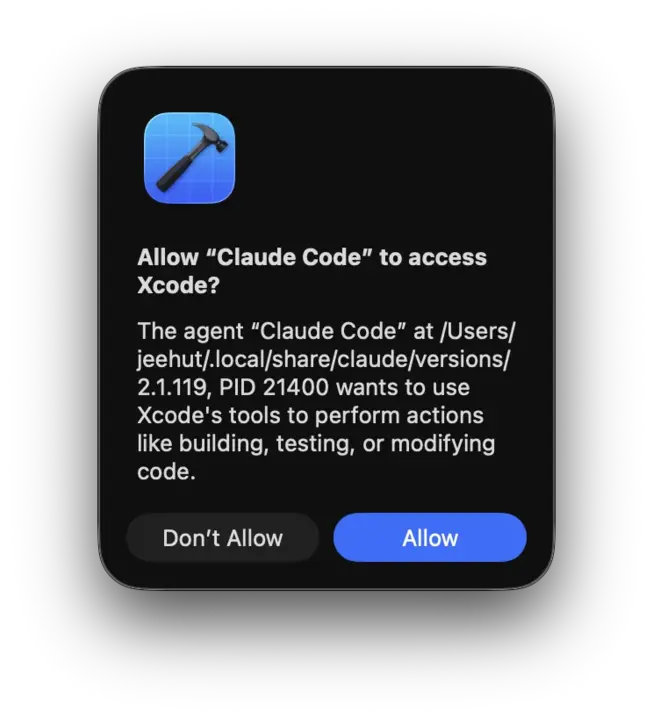
Please please please stop showing me this 50 times a day. On every. Single. Session. Again. And again. And no need to wait for WWDC for the fix. Thank you in advance. 🤍 (I use this workaround.)