
Your Feedback Actually Gets Read
There is a common belief in the developer community that filing Feedback Assistant reports (the successor to Radar) is pointless – that reports disappear into a void and nothing ever happens. I had a feature request implemented in Xcode 26, which proves otherwise.
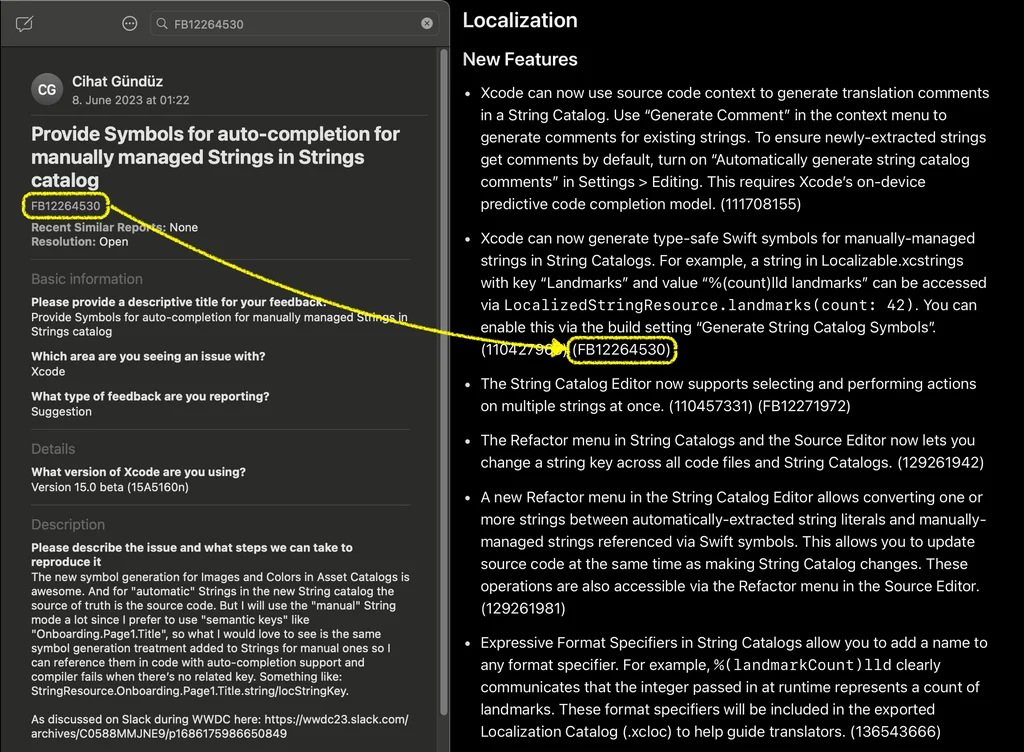
Seeing a feature you requested show up in a keynote or release notes is a satisfying validation. But more importantly, it demonstrates that Apple’s engineering teams do review and prioritize community feedback, even when they never respond to the report directly.
Tips for Writing Effective Feedback
Not all reports are created equal. Here is what I have found increases the chances of a report being actionable:
Be specific about the problem. “Xcode is slow” is not useful. “Xcode’s SwiftUI preview takes 12 seconds to refresh when the file contains more than 3 #Preview blocks” gives engineers something to investigate.
Include a sample project. A minimal reproduction project is the single most valuable thing you can attach. If an engineer can build and run your project to see the issue, you have removed the biggest barrier to them investigating it.
Describe the use case, not just the solution. Instead of “add a button that does X,” explain why you need it: “When working with large SPM graphs, I need to quickly identify which target a file belongs to because…” This gives the team context to design the right solution, which might be different from what you imagined.
File during beta season. The weeks after WWDC are when Apple’s teams are most actively collecting feedback on new features. Reports filed during this window get significantly more attention than those filed in the middle of a release cycle.
Make It a Habit
Every WWDC beta season, set aside time to test your apps against the new OS and Xcode betas. File reports for every issue and every missing feature. Most will not get a response, but some will quietly influence future releases.