
You may be aware of some traditional methods of hiding secrets like an API key or some 3rd party services’ token you need for your app. But nowadays approaches to modularize your app using SwiftPM become more and more popular.
For example, Point-Free has a great free episode on this topic and Majid Jabrayilov recently wrote a 4-parts series on “Microapps architecture” (parts 1, 2, 3, 4) which I can both recommend to get started.
Also, you might even want to hide secrets in public Open Source libraries, e.g. in the unit tests of some 3rd party service integration where users of the library will provide their own token, but you want your tests to run with your own.
What these situations have in common is that they are based on a custom maintained Package.swift file — not the one Xcode maintains for you if you just add a dependency to an app project. The app or project is split into many small modules with no corresponding .xcodeproj file, Xcode just opens the Package.swift file directly, without the need for a project.
This also means, that for the separate modules, there’s no way to specify any build settings or build scripts within Xcode, all needs to be done right within the Package.swift manifest file.
While more and more such features are being added to SwiftPM (like SE-303, SE-325, SE-332) in future releases, there’s no sign they will support any Xcode-specific features such as .xcconfig files.
How can we hide secrets from committing to Git to ensure we’re not leaking them to our Git provider or anyone else with access to our repo today?
SwiftPM resources & JSONDecoder
I’m sure there’s no single “best” answer to this and others may have smarter ideas than mine. But I like to keep things simple and I also like to use basic features because I know them well & I expect other developers to understand them quickly if needed. Plus I can be sure they’re future-proof.
The approach I want to use is the classical .env file approach which is common in web development. But instead of a custom-formatted .env file, I want to simply have a .json file with my secrets in it, because JSON files are familiar to many iOS developers and we have built-in support for parsing them in Swift thanks to JSONDecoder. Loading files or more generally “resources” is also supported by SwiftPM since Swift 5.3 (SE-271).
Here’s the basic idea of how I want to hide secrets from Git outlined:
Check in a
secrets.json.samplefile into Git with the keys, but no valuesLet developers duplicate it , remove the
.sampleextension & add valuesIgnore the
secrets.jsonfile via.gitignoreso it’s never checked inProvide a simple
structconforming toDecodableto read the secrets
The rest of this article is a step-by-step guide on how to apply this approach. I will be using the unit tests of my open source translation tool BartyCrouch which integrates with two 3rd-party translation services as an example.
⚠️ Please note that if you plan to apply this approach to an app target which you will ship to users, you will probably run into the same problem as described in the
.xcconfigapproach in this NSHipster article. My method only helps hiding the secrets from Git, you will need additional obfuscation if you plan to ship to users.
Adding the secrets.json resource file
First, let’s add the secrets.json file to our project. As there’s going to be a corresponding secrets.json.sample and a Secrets.swift file, I opt for creating a folder Secrets first, then I create an empty file which I name secrets.json and I add a simple JSON dictionary structure with two keys:
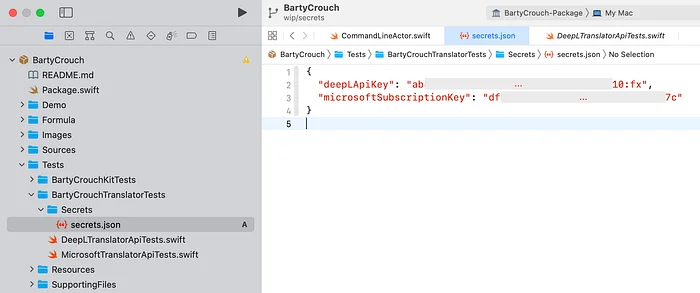 secrets.json file with two actual secrets, added to the project." loading="lazy" />
And so my CI is also set up to access my secrets safely without leaking them.